![Logo Fancy shading@2x.png]](https://creator.myminifactory.com/hs-fs/hubfs/Logo%20Fancy%20shading@2x.png?height=40&name=Logo%20Fancy%20shading@2x.png)
After making a purchase on MyMiniFactory, invoices are automatically generated and available to download as PDFs from multiple locations. Simply click on the invoice or download button to access your invoice.
Note: Invoices are available for all orders, including your full purchase history.
Invoices can be found:
-
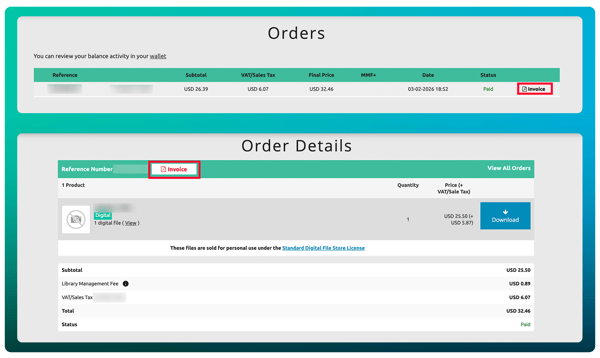
In the Orders and Order Details page for regular purchases.
-
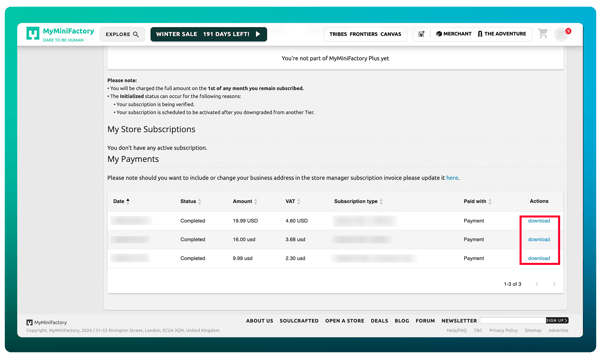
In the Subscriptions page for MyMiniFactory Plus and Tribes payments.
-
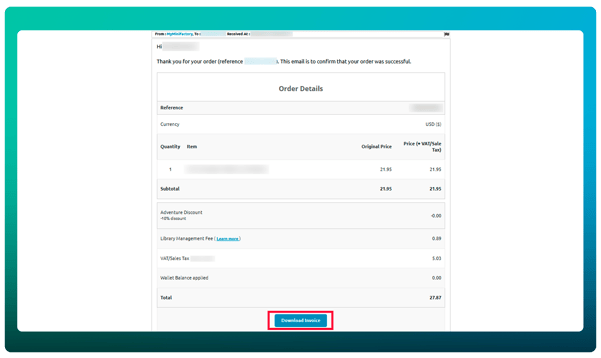
And in any payment confirmation message a user receives in their MyMiniFactory inbox.
Note: Payment confirmation emails received before February 11th, 2026 will not include the Download Invoice button. To access an invoice from these emails, click the order reference link (e.g., "Thank you for your order (reference XXXXXXXX)") to go to the associated order details page.
Business Details
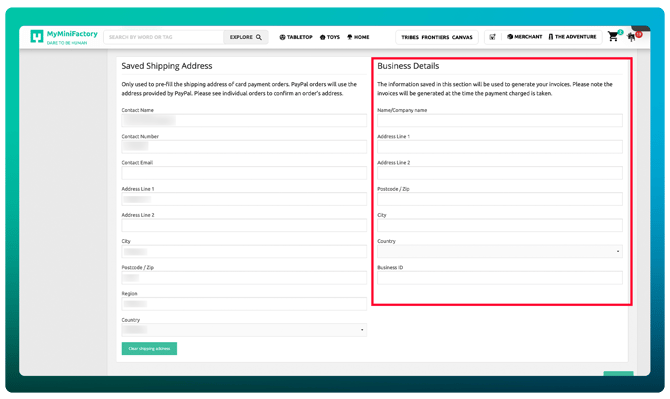
If a users adds business details to their account all future invoices will use these details instead of the current profile details for the account.
Note: If a User profile has business details entered in their profile page the invoice will display their business details, instead of their regular profile details.
Details are set at the time of invoice generation. If a user changes their business address, then previously generated invoices will not update retrospectively.
Quick links
You can find your orders and order details pages here >
Your Subscriptions page here >
Your MyMiniFactory inbox here >
And you can update your business details here >