![Logo Fancy shading@2x.png]](https://creator.myminifactory.com/hs-fs/hubfs/Logo%20Fancy%20shading@2x.png?height=40&name=Logo%20Fancy%20shading@2x.png)
Local Currency Billing is designed to benefit the entire MyMiniFactory ecosystem.
For Creators, it means choosing a single Reference Currency in which to set prices, manage sales, view statistics, and receive payouts. This simplifies international business management and can reduce unnecessary currency conversions and the associated costs charged by banks, PayPal and other payment providers, helping Creators retain more of the value they generate.
For customers, it means seeing prices and paying in a familiar local currency, making purchases easier to understand and reducing unexpected conversion charges from banks or card providers.
The objective is simple: a smoother purchasing experience for customers, easier financial management for Creators, greater potential for international sales, and more revenue retained within the Creator ecosystem. Your Reference Price remains protected, and any additional value generated through international pricing is credited through the International Pricing Adjustment.
It is important to clarify how the system works and what it means in practice for Creators. The FAQ below addresses the main questions around Reference Currency, price migration, customer local pricing, earnings, reporting, and payouts.
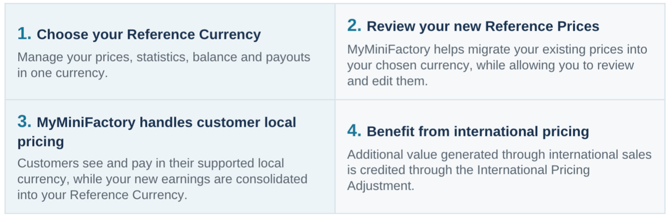
How it works at a glance:
Reference Currency
What is a Reference Currency?
Your Reference Currency is the single currency you use to manage your business on MyMiniFactory.
It is used to:
-
set your Reference Prices;
-
view your sales and statistics;
-
track your balance;
-
receive payouts.
You can choose from USD, EUR, GBP, CAD, AUD and NZD.
You can only have one active Reference Currency at a time.
What changes when I select a new Reference Currency?
Your selected currency becomes the currency used for your pricing, reporting, balance and payouts.
Your existing prices will be migrated into your new Reference Currency from the 1st of the following month.
Once your new Reference Prices are confirmed, MyMiniFactory will use them to calculate the local prices shown to customers paying in other supported currencies.
What happens if I do not select a new Reference Currency?
No action is required if you wish to remain in USD.
If you do not select a new Reference Currency, your account will remain in USD by default, and your current pricing and reporting currency will not change.
Can I change my Reference Currency later?
Yes.
To make a change effective from the first day of the following calendar month, you must confirm it by 23:59 UTC on the 27th of the current month, according to MyMiniFactory platform time.
For example, a change confirmed by 23:59 UTC on 27 August will take effect on 1 September.
A change confirmed after the deadline will take effect on the first day of the subsequent calendar month. For example, a change confirmed on 28 August will take effect on 1 October.
Only one Reference Currency can be active at a time. Completed transactions will not be repriced or otherwise altered by the change.
Migration of Existing Creator Prices
How are my current prices converted when I change Reference Currency?
When changing your Reference Currency, you can choose between two migration methods.
Stable Conversion — (Highly recommended)
MyMiniFactory automatically proposes new prices using recent market exchange-rate data and familiar local price points.
Prices are rounded to standard amounts such as `.50`, `.95`, `.99` or `.00`, depending on the currency. The proposed prices are designed to preserve your Reference Price and avoid unintended reductions in the amount used to calculate your earnings.
This automated process makes the migration practical for creators who may have hundreds or thousands of products, tiers and pledge levels.
You can review and edit the proposed prices before confirming the change. You may also update individual product, tier or pledge prices manually after the migration has been completed.
Stable Conversion is a one-time price migration method. It does not lock future exchange rates or customer local prices.
Keep 1:1
The numerical value of each price remains unchanged, and only the currency changes.
For example:
> 10 USD becomes 10 EUR.
This option may be suitable when moving between currencies with broadly comparable nominal values, such as USD, EUR and GBP.
It is not recommended when the currencies differ significantly in value. For example, changing from USD to NZD on a 1:1 basis may result in substantial unintended price changes.
These two options only apply to the one-time migration of your existing prices into your new Reference Currency. The local prices shown to customers in other currencies are calculated separately through MyMiniFactory’s Automatic Local Pricing system.
Can I preview the proposed prices before confirming?
Yes, but only for your new Reference Currency.
You will be able to review the proposed prices in your new Reference Currency before confirming and scheduling the change.
Nothing will take effect until you have reviewed and confirmed the migration.
Can I manually edit the proposed prices?
Yes.
You can adjust any proposed amount before your new Reference Currency takes effect.
Once confirmed, these amounts become your new Reference Prices and will be used by MyMiniFactory to calculate customer-facing prices in the other supported currencies.
You may also continue to edit individual product, tier or pledge prices manually after the migration.
What happens to my Store, Tribes and FronTiers prices?
The migration process covers:
-
Store object prices;
-
Tribe tier prices;
-
FronTiers campaign and pledge prices.
MyMiniFactory will propose prices in your new Reference Currency, which you can review and edit before confirming the change.
Completed purchases and existing pledges will not be repriced. Updated Reference Prices will apply to new purchases, subscriptions and pledges after the change takes effect.
No existing Tribe subscription will be cancelled or interrupted as a result of changing your Reference Currency.
What happens to my existing balance and historical reporting?
Your existing balance will not be converted automatically when you change your Reference Currency.
You will be able to:
- keep the existing balance in its current currency and request a payout in that currency; or
- choose to convert the balance into your new Reference Currency.
Completed transactions will not be repriced or altered, and the original transaction records will remain available in your reporting history.
New earnings generated after the change takes effect will be reported in your new Reference Currency.
Customer Local Pricing
How does MyMiniFactory calculate prices shown to customers in other currencies?
Once your Reference Prices are set, MyMiniFactory automatically calculates customer-facing prices in each supported currency.
These prices are based on recent market exchange-rate data and MyMiniFactory’s local pricing rules.
This customer-facing pricing process is separate from the one-time migration of your own prices when you change Reference Currency.
Why are customer prices different from a live Google exchange rate?
Google and similar services generally display a live or near-live exchange rate at a particular moment. These rates can fluctuate continuously and are not designed for stable commercial pricing.
MyMiniFactory instead uses recent market exchange-rate data, reviewed daily, together with local pricing and rounding rules. This keeps customer prices current and commercially appropriate while protecting your Reference Price.
As a result, customer prices may differ from a direct conversion shown by Google or another FX website.
Selling in another supported currency will not reduce the earnings basis generated from your Reference Price, regardless of the Reference Currency you choose.
How often are customer prices updated?
MyMiniFactory reviews customer-facing prices daily and updates them where appropriate using recent market exchange-rate data.
We do not use an instantaneous spot rate, as this could cause prices to fluctuate continuously throughout the day. The objective is to keep local prices current while maintaining reasonable stability for customers and Creators.
Daily reviews apply to prices offered for new purchases and new subscriptions. They do not change the amount billed to existing Tribe subscribers.
Why does MyMiniFactory apply local pricing and rounding rules?
Direct currency conversion often produces unfamiliar prices such as `14.53` or `18.27`.
MyMiniFactory adapts these amounts to commercially appropriate local price points, such as `.50`, `.95`, `.99` or `.00`, depending on the currency.
This makes prices clearer and more familiar to customers in each market while protecting the Creator’s Reference Price.
Earnings and Reporting
How are my earnings protected?
When a product or subscription is sold in another supported currency, your Reference Price remains the minimum basis used to calculate your earnings.
The usual platform fees, payment-processing fees, refunds, chargebacks and other applicable deductions continue to apply in the normal way.
What happens to existing Tribe subscribers?
No existing Tribe subscription will be cancelled, interrupted or otherwise lost when you change your Reference Currency.
Existing subscribers will remain subscribed and continue to be billed in the currency and at the price associated with their current subscription.
For example, if you change your Reference Currency from USD to EUR, subscribers who originally joined in USD will continue to be billed in USD.
The revenue generated by those subscriptions will then be converted and consolidated into EUR for your statistics, balance and payouts.
Your updated Tribe prices will apply to new subscribers after the currency change takes effect.
What happens if an existing Tribe subscriber changes tier or resubscribes?
If an existing subscriber changes to another tier, or cancels and later resubscribes, the subscription will use the price available for that tier at the time of the new subscription or tier change.
Subscribers who make no changes will continue to be billed under their existing subscription terms.
What is the International Pricing Adjustment?
The International Pricing Adjustment, or IPA, is an additional amount credited to you when MyMiniFactory’s local pricing system generates extra value from sales made in a currency other than your Reference Currency.
The IPA is calculated across your international sales for each reporting period and appears as one consolidated positive line in your reporting.
It can only increase your earnings and will never be applied as a deduction.
What currency will appear in my statistics and payouts?
New sales statistics, earnings, balance and payouts will be consolidated and displayed in your selected Reference Currency from the effective date of the change.
Customers may continue to pay in any supported local currency, but MyMiniFactory handles the conversion automatically so that you only need to manage your business in one currency.
Any existing balance that you choose to keep in your previous currency will remain separate until it is paid out or converted.
Can choosing the right Reference Currency reduce PayPal or bank conversion fees?
Yes, it may help you reduce or avoid unnecessary currency-conversion fees.
MyMiniFactory will issue your payout in your selected Reference Currency. Choosing a currency that your PayPal or bank account can receive directly may prevent your payment provider from performing an additional conversion.
PayPal, banks and other payment providers may still apply their own fees or currency rules. We therefore recommend selecting a Reference Currency that is supported directly by your payout account.
If you have any further questions about multi-currency support please contact finance@myminifactory.com.
Read the full guide on changing your reference currency here >